Cloud Access Security Broker (CASB): A Comprehensive Guide for KMUs
Estimated reading time: 7 minutes
Key Takeaways
- Visibility into cloud usage is critical for detecting shadow IT and preventing unauthorized data access.
- Endpoint security ensures that both managed and unmanaged devices stay compliant with security policies.
- Consistent workload protection across SaaS, IaaS, and PaaS platforms helps KMUs maintain uniform cloud security.
- Choosing the right CASB ensures compliance, simplifies management, and reduces risk for KMUs.
Table of contents
Understanding CASB for KMUs
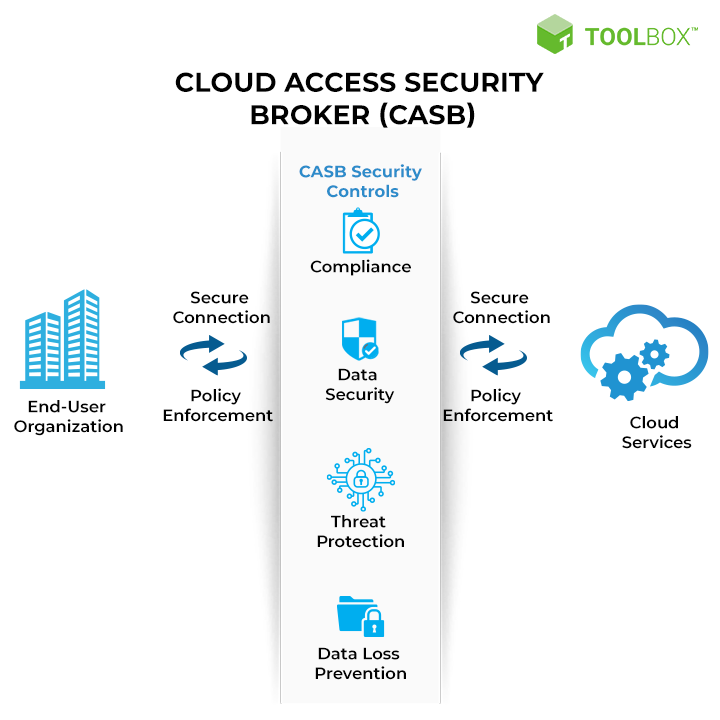
In today’s cloud-driven era, CASB solutions are vital for safeguarding small and medium-sized enterprises against rising cyber threats. These tools act as a security enforcement layer between cloud service consumers and providers, extending on-premises controls into cloud environments. For KMUs with limited budgets and in-house expertise, a CASB can offer enterprise-grade protection in a more accessible format.
Without adequate CASB measures, KMUs risk unauthorized cloud usage and potential data breaches. As Microsoft explains, a CASB solution helps address limited IT resources, tight budgets, and complex compliance needs in smaller organizations.
Key Features of CASB Solutions
1. Cloud Security Monitoring
This feature offers critical insights into all cloud activities within an organization. Detecting shadow IT, tracking user behavior, and generating risk assessments help KMUs maintain a secure cloud environment. You can learn more about cloud security strategies for KMUs to see how monitoring streamlines decision-making. For additional details, visit Cloudflare’s CASB overview.
2. Cloud Endpoint Security
Modern CASB solutions ensure that both managed and unmanaged devices comply with company policies, preventing data leakage and unauthorized access. They support remote work scenarios, BYOD policies, and enforce rules based on device health, location, and user credentials. According to extended cybersecurity solutions for KMUs, endpoint security is critical for smaller businesses. See Microsoft’s CASB description for more information.
3. Cloud Workload Protection
CASBs also secure applications, infrastructure, and configurations. They track runtime behavior, ensuring consistent security policies across SaaS, IaaS, and PaaS. For KMUs, this unified approach to cloud compliance ensures that data remains protected at every stage of the cloud journey.
Comparing Technical Solutions
Evaluation Criteria
- Deployment Options: Proxy-based, API-based, or hybrid solutions
- Integrations: Compatibility with identity providers, security tools, and Managed Security Services
- Cloud Service Coverage: SaaS, IaaS, and PaaS
- Cost Structure: Scalability and pricing models for KMUs
More details on CASB features can help you compare monitoring, endpoint security, and workload protection tools effectively.
Benefits of Implementing a CASB
Enhanced Security
Full visibility helps monitor all cloud apps and user activities, reducing the risk of shadow IT. With consistent policy enforcement, threats are detected early to protect sensitive data.
Compliance Advantages
Adopting a CASB often simplifies the path to meeting IT security and compliance standards that smaller enterprises need to follow. Automated policy enforcement, reporting tools, and regulatory alignment reduce management overhead.
Operational Efficiency
Consolidating key security functions into a single platform ensures scalability and lower costs. This unified approach streamlines management and reduces the burden on limited IT staff. Learn more about CASB benefits from Cloudflare.
Case Studies and Real-World Applications
Many KMUs implement CASB solutions using a phased approach, starting with business-critical applications and expanding as their security posture matures. Frequent policy reviews and continuous monitoring help maintain a secure cloud environment.
Further guidance on step-by-step cloud security best practices for KMUs highlights the importance of integration with existing systems and strong user education programs.
Conclusion
A CASB is no longer an optional add-on for KMUs—it’s a necessity for ensuring secure and compliant cloud usage. With features that span monitoring, endpoint security, and workload protection, CASBs provide a single pane of glass for cloud security management.
Implementing the right CASB offers comprehensive visibility, helps meet compliance requirements, and protects critical data across diverse cloud environments. For KMUs, leveraging a CASB is a key step toward robust, affordable security. More information can be found at this KMU cloud security guide.
Call to Action
Here’s how you can start your CASB evaluation:
- Document your current cloud application inventory
- Define tangible security and compliance objectives
- Research and shortlist CASB providers that align with KMU needs
- Request demos and launch a pilot program
- Develop comprehensive shadow IT management guidelines
- Continuously review policies and adapt as your business grows
For more insights, visit Microsoft’s overview of CASB and begin securing your cloud footprint today.
Frequently Asked Questions
- What is a CASB exactly?
It’s a security point positioned between cloud service providers and consumers, extending policies and controls into cloud environments.
- Is a CASB solution only for large enterprises?
No. CASB solutions are now tailored to the needs of KMUs, offering flexible pricing and simplified management features.
- Can CASBs prevent data leakage on unmanaged devices?
Yes. CASBs can enforce access policies and apply data loss prevention rules, even for bring-your-own-device (BYOD) scenarios.
- How does a CASB assist with regulatory compliance?
By automating policy enforcement, providing audit logs, and streamlining reporting, a CASB helps KMUs meet various industry regulations.